What resolution does my artwork need to be?
Your images need to be at least 300dpi at the size they will be printed. That is the minimum for every product, large format included. Dpi means dots per inch: the number of dots of detail in every inch of the image.
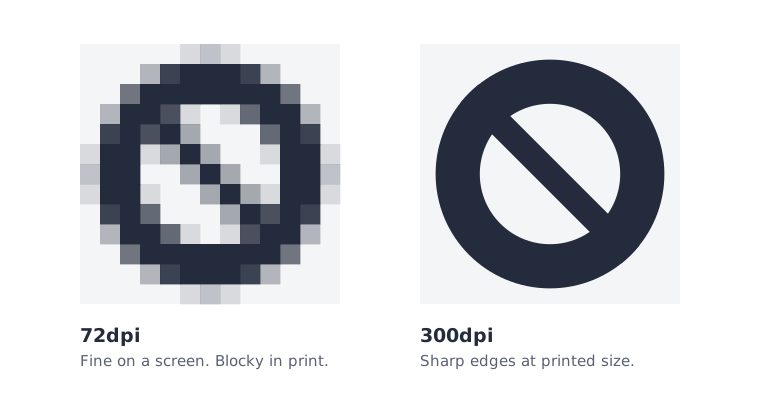
Why screen images often fail
Screens need far less detail than paper. An image saved from a website or social media is usually around 72dpi. It looks sharp on screen and soft or blocky in print.
How many pixels you need
Resolution depends on print size. The same photo can be 300dpi on a business card and far too low on an A4 flyer. These are the pixel sizes that give 300dpi across the whole page, before bleed:
| Finished size | Pixels at 300dpi |
|---|---|
| Business card, 85 x 55mm | 1004 x 650 |
| A6, 105 x 148mm | 1240 x 1748 |
| A5, 148 x 210mm | 1748 x 2480 |
| A4, 210 x 297mm | 2480 x 3508 |
An image that only fills part of the page needs fewer pixels.
How to check
- Open the image and look at its size in pixels. On Windows, right-click the file and choose Properties, then Details. On a Mac, select the file and press Cmd+I.
- Divide the width in pixels by 300. The answer is the widest it can print, in inches, and still be sharp.
- Or zoom in to 300% on screen. If it looks blocky there, it will look soft in print.
What does not work
Changing the dpi setting, or stretching a small image to make it bigger, does not add detail. The software invents the missing dots and the result is blurry. Go back to the original photo or ask whoever made the logo for a larger version.
Logos and text
Logos and text are best supplied as vectors - shapes drawn with lines, not pixels - because they stay sharp at any size. A logo saved as a PDF, EPS, AI or SVG file is usually a vector.